You’ve created your client profiles; now you can set up your reminder scenarios and associate them with your client profiles!
Reminder scenarios let you define the actions to be taken at each stage: advance notice, follow-up, and thank-you. This setup applies to each type of client and lets you choose whether to opt for automated reminders or not.
When your account is created, and after the first data synchronization, a default reminder scenario is provided for the "Standard" client profile—designed for clients with and without email addresses.

We recommend creating as many scenarios as you have client profiles to ensure all clients are included in your reminders.
Below, we’ll detail the steps to create a reminder scenario.
Create a scenario
Before proceeding, you must create your client profiles.
Go to the Scenarios page (Settings > Scenarios) and click on the "Add Scenario" button:

- A pop-up will appear asking you to select the client profile for which you want to add a new scenario.
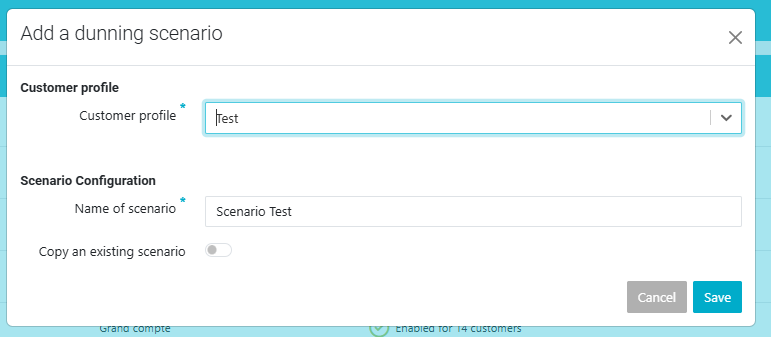
You can then choose between using the existing models or generating new ones.
1. Use Existing Templates: The created scenario will have the same steps and templates associated with the selected profile (Standard Scenario in the example below). 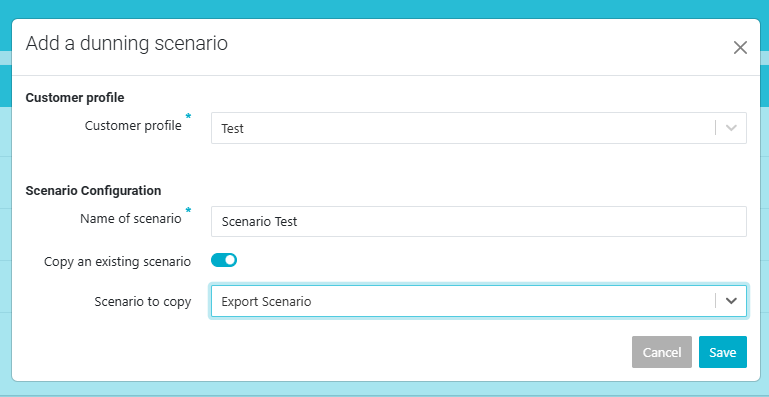
2. Do Not Use Existing Templates: The scenario will be created, and new templates will be generated for the selected profile.
If you don’t copy an existing scenario, several new templates will be created automatically for each step of the scenario, both with and without email. You can quickly end up with a long list of templates that are difficult to edit and maintain
- Click the 'Save' button.
- You are on the scenario editing page, which has two columns: one for clients with email and another without.
- Edit your scenario as explained in this article: configure the steps for each scenario, and then save.
- When you return to the Configure > Scenarios page, a new row has been added with the scenario you juste created

Was this article helpful?
That’s Great!
Thank you for your feedback
Sorry! We couldn't be helpful
Thank you for your feedback
Feedback sent
We appreciate your effort and will try to fix the article